
Guide · Brandon Warrell
How to prepare your logo and business info for a vehicle wrap
To prepare a logo for a vehicle wrap, send it as a vector file (AI, EPS, SVG or a vector PDF) with the fonts converted to outlines, plus one-color and reversed versions and your exact brand colors. Keep the message short: your name, what you do and one phone number or website. Your designer or wrap shop then lays it out on a measured template for the vehicle's exact year, make and model, with key text kept off door handles, seams and windows.
Why does a wrap need a vector logo?
Vector files store shapes as math, so they scale to any size without losing quality. AI, EPS and SVG files are vector, and most PDFs are too. Raster files like JPG and PNG, even a PNG with a transparent background, are a fixed grid of pixels that blur when enlarged.
A logo copied from a website might be 500 pixels wide. Stretch it across 5 feet of a vehicle's side and you get about 8 pixels per inch, which prints as visible blocks. A JPG placed inside an AI or PDF file is still a JPG, too. To check a file, zoom in close. If the edges go soft or jagged, it's raster.
Cut vinyl lettering needs vector art even more. It's cut from solid sheets of colored vinyl, one color per sheet. Signs.com, for example, asks for AI, EPS, SVG or PDF vector files and says gradients and shadows aren't possible.
Before paying for a redraw, check whether a vector version already exists. Ask whoever designed the logo, or a shop that printed your signs, shirts or business cards. They may have an AI, EPS or PDF file. If not, a small or blurry logo needs to be redrawn as vector first. The logo file types guide explains which file to use where.
Why convert fonts to outlines?
If the shop opens your file on a computer without your fonts, the software swaps in a stand-in font and your text shifts. Converting type to outlines (in Illustrator, Type > Create Outlines) turns each letter into a shape, so nothing can be swapped. Outlined text can't be edited, so keep an editable copy for later changes.
Which versions of the logo do you need?
A wrap often needs several versions:
- Full color: the main version, for light, open areas.
- One color: for cut vinyl lettering, and for spots where the full-color logo gets busy.
- Reversed: a white or light version for dark paint or dark parts of the design. Dark text reads best on light vehicles, and light text on dark ones.
- Plain name: if your logo uses a decorative font, set the business name in a clear, simple font nearby.
How do you keep it readable at a distance and at speed?
People may see a vehicle for only a few seconds, often in traffic:
- Use strong contrast between the text and the background.
- Pick simple, sturdy fonts, not ornate scripts.
- Size text for the distance. A common sign-industry rule of thumb is 1 inch of letter height for every 10 feet of viewing distance. By that rule, a phone number meant to be read from 50 feet calls for letters about 5 inches tall.
- Leave open space around the logo and contact details.
What should the wrap say?
Keep it to a few items:
- Your business name or logo.
- What you do, in a few words.
- One way to reach you: a phone number or a website.
Some sign shops borrow a billboard guideline here: about seven words. Pick one call to action. Skip prices, dates and short-term deals, because a wrap often stays on for years. Put the logo on both sides and the back, since most people see one side at a time.
Where should text and logos go on the vehicle?
Put the logo, phone number and website on smooth, unbroken areas. Favor the upper part of the body, which sits closer to other drivers' line of sight. Keep key text away from:
- Door handles and the gaps between doors.
- Seams, where the installer joins panels of vinyl.
- Deep body lines and recesses, where stretched vinyl distorts lettering.
- Wheel wells, mirrors, lights and trim.
- Windows.
The rear side windows and the back window can carry perforated window film, also called one-way vision film. It's printed on the outside and covered in small holes so people inside can still see out. A common choice for vehicles is 50/50 film, where about half the surface is open. That costs detail: small text and thin lines get lost. Use windows for bold shapes or a large logo, and keep the phone number and website on the body. Leave the windshield and front side windows clear, and ask the shop what your state allows on the rear side windows and back window.
Why work on a measured template?
Every year, make and model has its own panels, door handles, windows and body lines. Trim levels and aftermarket parts, like a different bumper, change things too. A measured template shows where each of those falls, so the artwork lands where it should once it's printed and installed. Ask the installer for the template they use before design starts.
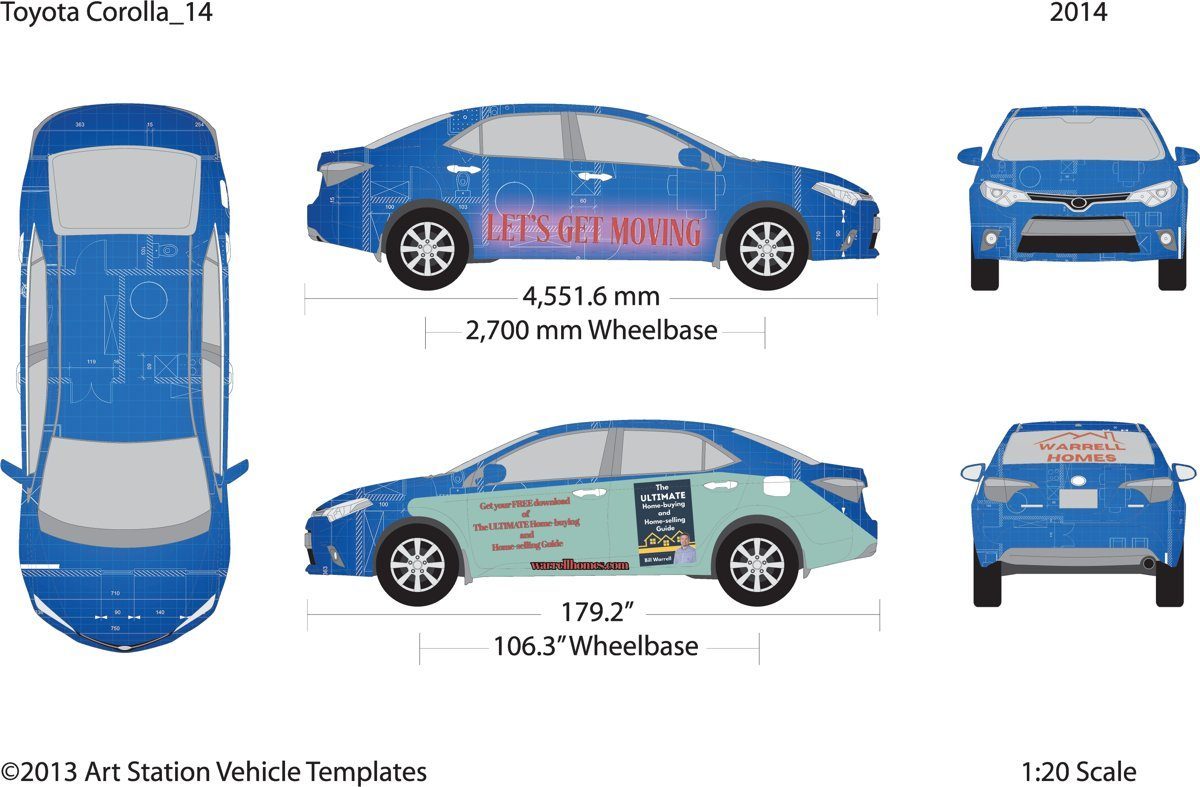
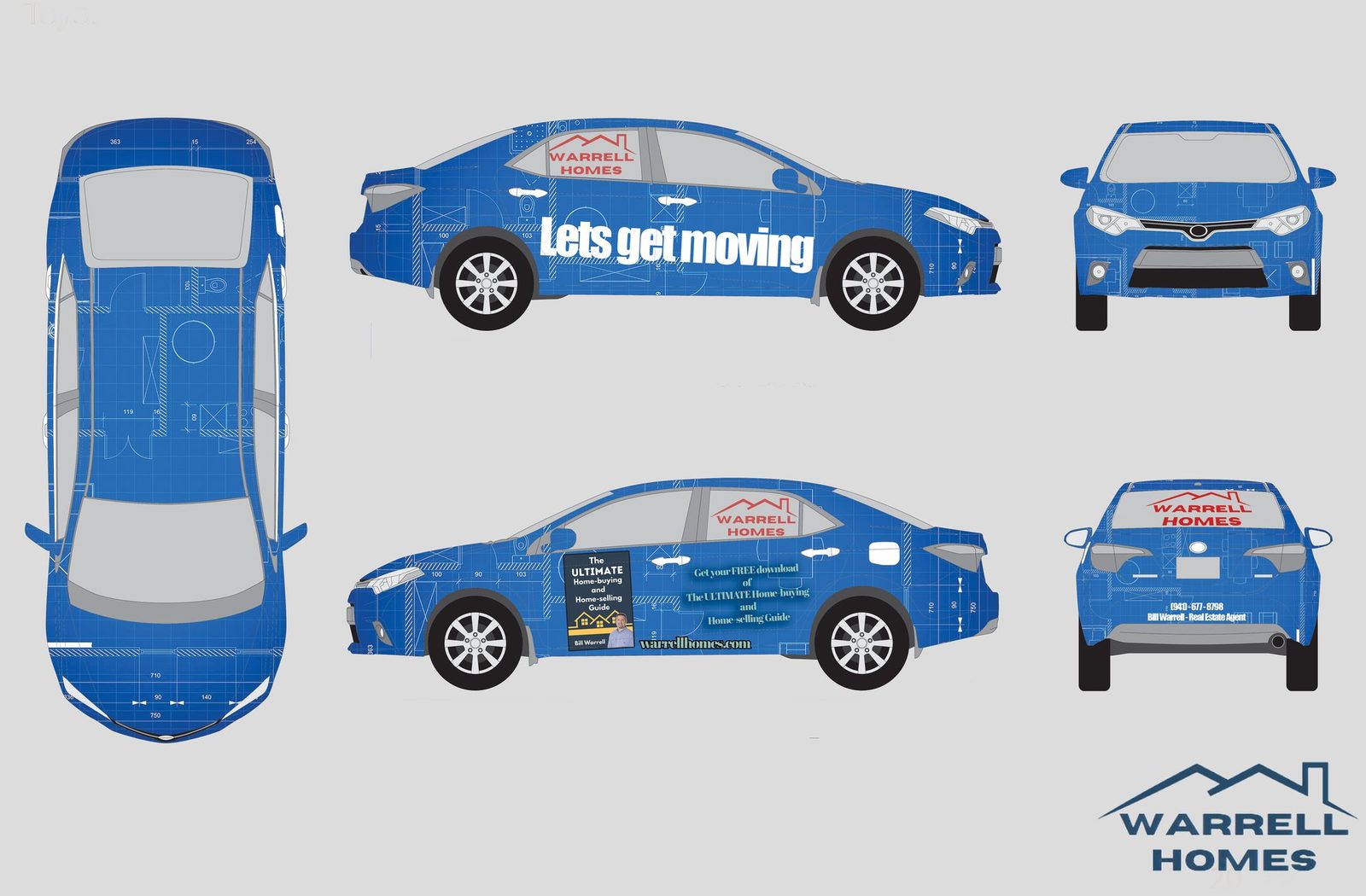
My Warrell Homes wrap, SCF coursework made for the real-estate business my dad ran, shows the template step. The final layout sits on a measured 1:20 Toyota Corolla template, so the artwork lines up with the panels, windows and wheelbase (the template lists 4,551.6 mm overall and a 2,700 mm wheelbase). It's a class project, not a model of every tip on this page: the headline crosses the gap between the doors, the guide offer runs past seven words, and the logo appears only on the back window. See the full vehicle wrap design write-up.
How do you match brand colors on a wrap?
Give the shop exact color references: Pantone numbers if you have them, plus the CMYK and hex values you already use. Then expect close, not perfect. Printed wraps build color from process inks, and Pantone notes that many of its spot colors fall outside the CMYK range. Metallic colors can't be simulated with CMYK at all.
Screens mislead, too: a monitor gives off light while vinyl reflects it. Don't approve colors from a screen. Ask the shop for a printed swatch on the actual vinyl, and look at it outdoors in daylight, next to the vehicle.
What resolution do photos need?
Photos are raster, and shop guidance varies. A common target is 100 to 150 pixels per inch at full printed size, and some shops ask for up to 300. Ask your shop for its number before you choose photos.
A 12-megapixel photo is about 4,000 pixels wide. That covers about 27 inches at 150 pixels per inch, or 40 inches at 100, roughly one door. The side of the Corolla on my template is about 179 inches long, so one phone photo won't fill it at those settings. Use photos on smaller areas, or ask the shop how far it can enlarge one. If the file is built at reduced scale, the resolution goes up by the same factor: at 1:10 scale, a photo needs ten times the pixels per inch.
What files should you send?
Before design starts, gather:
- Your logo as a vector file, in full-color, one-color and reversed versions.
- Fonts outlined. If text must stay editable, list the fonts you used, and check each license before sending font files. Some can't be shared, including fonts from Adobe Fonts.
- Brand colors as Pantone numbers, plus CMYK and hex values.
- Original, full-size photos, not copies saved from social media or a website.
- The exact wording, proofread.
- The vehicle's year, make, model and trim, plus straight-on photos of each side.
- Your wrap shop's name and contact, so your designer can get its template and file specs: format, scale, bleed and color settings.
Your designer then builds the final print file to the shop's specs, usually with extra background past every edge (bleed, often several inches on a car) and all linked images packaged together.
Need a hand?
I design wrap layouts on a measured template of your vehicle, set up to your wrap shop's specs, and I'm happy to work with the shop directly. I don't print or install. If your logo is only a blurry JPG, I can redraw it as a clean vector file.
Wrap layouts start at $300, and every job gets a fixed quote up front. The first draft takes 2–4 business days, and rush is possible. Three rounds of revisions are included. Extra rounds are billed hourly, and I'll tell you before any charge. I'm based in Palmetto, FL, and work with clients anywhere. Common questions are in the FAQ, and more how-tos are on the guides page.
Start a project or book a 15-minute call, Monday to Friday, 9am–6pm ET.