
Article · Brandon Warrell
Standard banner ad sizes, with Google and IAB names and the rules for animated GIF ads
The standard banner ad sizes are 300 × 250 (medium rectangle), 336 × 280 (large rectangle), 728 × 90 (leaderboard), 970 × 90 (large leaderboard), 160 × 600 (wide skyscraper), 300 × 600 (half-page ad) and 320 × 50 (mobile banner). Those seven are the sizes Google recommends for uploaded display ads in Demand Gen campaigns. Sizes are always width × height in pixels. File rules matter as much as size: Google caps image ads at 150 KB, and its newer Demand Gen campaigns accept still images only, so an animated GIF won't run there.
What are the standard banner ad sizes?
The table below follows Google Ads Help, "Uploaded display ads specifications", checked 2026-10-31, in Google's four groups. The IAB column is from the IAB New Ad Portfolio fixed-size spec. A dash means the IAB fixed spec doesn't name that size.
| Group | Size (px) | Google's name | IAB name |
|---|---|---|---|
| Rectangle | 200 × 200 | Small square | – |
| Rectangle | 240 × 400 | Vertical rectangle | – |
| Rectangle | 250 × 250 | Square | – |
| Rectangle | 250 × 360 | Triple widescreen | – |
| Rectangle | 300 × 250 | Inline rectangle | Medium Rectangle |
| Rectangle | 336 × 280 | Large rectangle | – |
| Rectangle | 580 × 400 | Netboard | – |
| Skyscraper | 120 × 600 | Skyscraper | – |
| Skyscraper | 160 × 600 | Wide skyscraper | Skyscraper |
| Skyscraper | 300 × 600 | Half-page ad | – |
| Skyscraper | 300 × 1050 | Portrait | Portrait |
| Leaderboard | 468 × 60 | Banner | – |
| Leaderboard | 728 × 90 | Leaderboard | Leaderboard |
| Leaderboard | 930 × 180 | Top banner | – |
| Leaderboard | 970 × 90 | Large leaderboard | Super Leaderboard/Pushdown |
| Leaderboard | 970 × 250 | Billboard | Billboard |
| Leaderboard | 980 × 120 | Panorama | – |
| Mobile | 300 × 50 | Mobile banner | Smartphone Banner |
| Mobile | 320 × 50 | Mobile banner | Smartphone Banner |
| Mobile | 320 × 100 | Large mobile banner | – |
Google also lists regional sizes, such as 750 × 200 for Poland.
Which sizes cover the most placements?
If you only build a handful, start with Google's recommended list for uploaded display ads in Demand Gen: 300 × 250, 336 × 280, 728 × 90, 970 × 90, 160 × 600, 300 × 600 and 320 × 50.
320 × 100 (large mobile banner) is on Google's uploaded display ads size list but not on its Demand Gen recommended list or the IAB fixed list, so confirm it with the network before you build it.
Other ad networks and publishers set their own specs, so ask for their spec sheet before you size anything.
What does each size name mean?
The names describe the shape and the spot on the page. Rectangles sit inside the content. Leaderboards and billboards run wide across the top. Skyscrapers and the half page run tall down a sidebar. Mobile banners are short strips sized for phone screens.
The names don't line up between sources. The IAB New Ad Portfolio calls 160 × 600 "Skyscraper", while Google calls it "Wide skyscraper" and uses "Skyscraper" for the narrower 120 × 600. "Half-page ad" for 300 × 600 is Google's name; the current IAB fixed spec doesn't list 300 × 600 as a named unit. Put the pixel size in every file name and brief.
The IAB spec also gives file weight targets. For the Skyscraper, Medium Rectangle and Leaderboard, the max initial load is 150 kB; for Smartphone Banners it's 50 kB. IAB measures these weights after gzip compression.
What file rules do animated GIF ads have to meet?
These are the rules on Google's "Uploaded display ads specifications" page (linked above), checked 2026-10-31. They are the rules for uploaded image ads in Google Display campaigns.
- File types: GIF, JPG or PNG. Only GIF can be animated.
- File size: 150 KB or smaller for image ads. HTML5 ads can be 600 KB or smaller.
- Length: the animation must be 30 seconds or shorter.
- Looping: animations can loop, but they must stop after 30 seconds.
- Frame rate: animated GIF ads must be slower than 5 FPS.
Check the frame rate first: video frame rates won't meet it.
What does Google Ads accept right now?
As of 2026-10-31, Google's help page "Google Display Ads campaigns have a new home in Demand Gen" says Google began a phased rollout of a migration tool in June 2026. It says new Display campaigns will later be created only within Demand Gen, and remaining eligible Display campaigns will be migrated automatically. Google gives no date for those later steps. Once a campaign is migrated, it can't be switched back.
What that means for your files today:
- Demand Gen: Google's Demand Gen image spec page says uploaded display ads can be .jpg, .png or .gif (non-animated), with a 150 KB maximum. It says animations aren't supported.
- Display campaigns not yet migrated: the Display rules above still apply until the campaign moves.
- HTML5: the migration page lists uploaded HTML5 ads as coming soon to Demand Gen, planned for late 2026.
If an animated banner is part of your plan, ask where it will run before anyone designs it. Check Google's Demand Gen image specs page on the day you upload.
How do you design for a tiny canvas?
A 320 × 50 banner gives you a strip 50 pixels tall.
- One message. Pick one thing people should know.
- Big type. If the headline doesn't read at actual size, it's too small. Check at 100% zoom.
- Brand and button. A logo and a clear call-to-action are worth the space.
- End on the call-to-action. If the ad animates, make the last frame show the message, brand and button, since under Google's Display rules a looping ad has to stop after 30 seconds and the frame it stops on should carry the message.
- Design the still first. With Demand Gen taking still images only, the best frame of your animation may end up as its own file.
Put the sizes, network and file limit in your design brief.
How far is a class banner from a real ad spec?
For an SCF Communication Design class in Spring 2025, I made Turntable Takeover, a fictional DJ night: an 11 × 17 event poster and a 2–4 second animated web banner built in After Effects from the same artwork, so both read as one campaign. The GIF in the case study is 160 × 600, 50 frames over 2.0 seconds (25 fps), loops forever and is 1,114,258 bytes, about 1.1 MB. The DJ photo is a stock image.
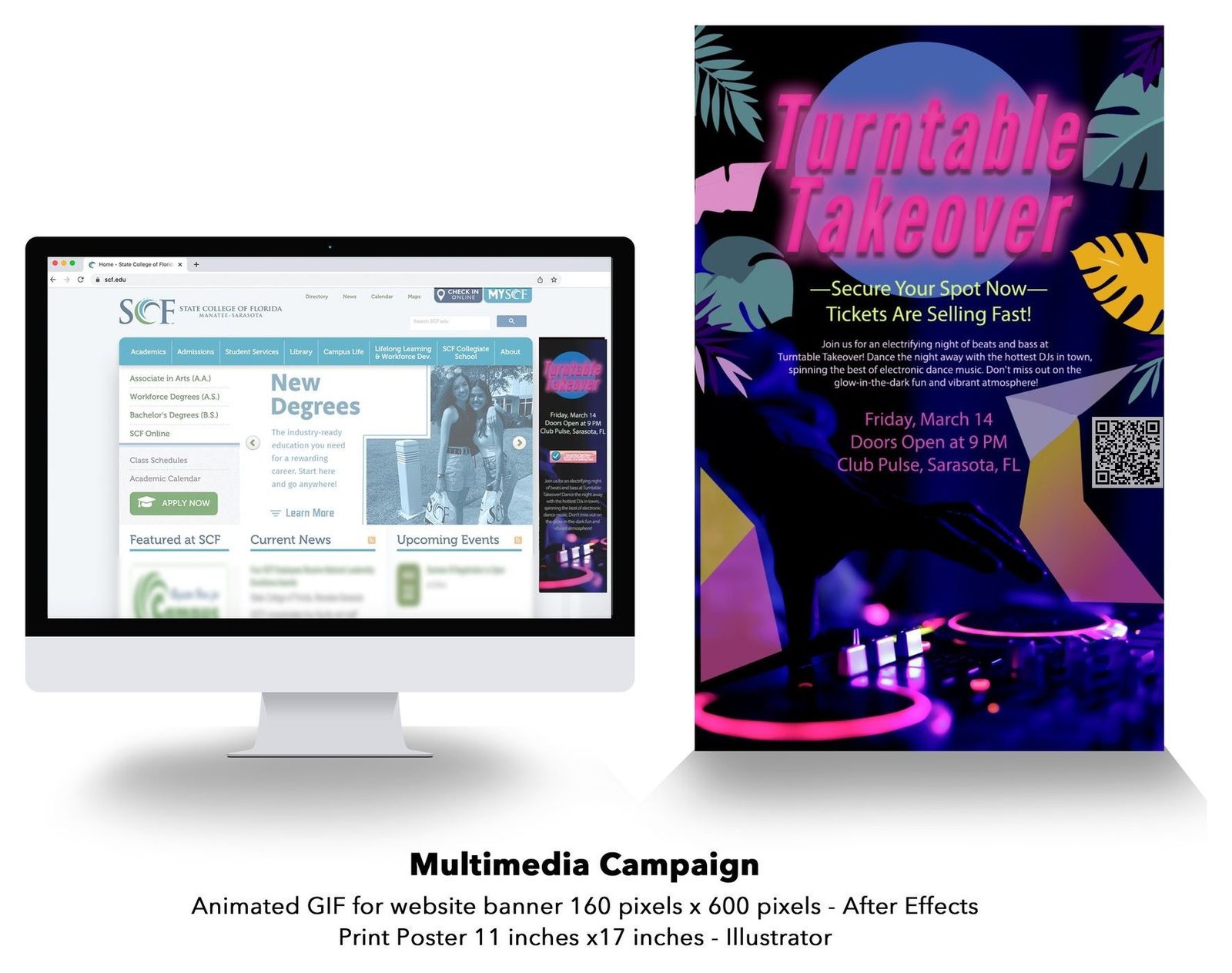
The size is on both of Google's size lists, and 2.0 seconds is well inside Google's 30-second limit. It was never built for Google Ads, though. Against the Display rules, the file is more than seven times the 150 KB limit, the frame rate is 25 fps against "slower than 5", and it loops forever instead of stopping by 30 seconds. Under Demand Gen, an animated GIF isn't accepted at all.
That gap is normal for a class piece. Real ad briefs start from the network's spec.
Need an animated web banner?
Animated web banners are one of the kinds of design I do, and they can be built from the same artwork as a print piece like a poster so the campaign reads as one. The FAQ answers common questions about how projects work.