
Guide · Brandon Warrell
How to write a design brief: what to send a graphic designer before you start
A design brief is a short note that tells a designer what the piece has to do, who it's for, every size you need, the exact text, the deadline, your budget and who signs off. Send it, with your logo files and a few examples you like, before any design work starts. A clear brief leads to a more accurate quote and fewer guesses, so revision rounds go to fine-tuning instead of filling in missing details.
Who writes a design brief?
The client usually writes it, and the designer asks questions to fill any gaps. You may also hear the term creative brief. Teams use the two terms in different ways, but a creative brief often goes deeper into the message and how it should speak to customers. A design brief covers the practical side: what gets made, by when and for how much. You don't need special software. The checklist below works as a free template: paste it into an email, a shared doc or a notes file. Keep it to a page or two, and include only the details that affect design decisions.
What should a design brief include? (free template)
Copy this checklist into an email or doc and answer each line. Short answers are fine. "Not sure" is a useful answer too, because it shows the designer where you want advice.
- About you: Your business name, what you sell or offer, and what sets you apart from competitors.
- Goal: What should this piece do? Sell tickets, bring in calls, launch a product or announce a new location. Pick one main job, and say how you'll know it worked, such as more calls or sold-out tickets.
- Audience: Who needs to notice it and act? Describe them in a sentence: age range, where they'll see it and what they care about.
- Deliverables and sizes: List every piece with its exact size, such as one 11 × 17 in poster, a 5.5 × 8.5 in flyer and a 1080 × 1080 px square social post. Add the file types you need back, such as a print-ready PDF or a PNG for social, and say if you also want the editable source files.
- Exact text: The final, proofread wording: headline, dates, times, prices, address, phone, website and any fine print. Paste it as text, not as a photo or screenshot.
- Deadline and destination: The date you need final files, the date it prints or goes live, and where it's going (a print shop, wrap shop, website or social platform).
- Budget range: A range is enough. It tells the designer how many concepts, sizes or custom illustrations make sense.
- Brand assets: Your logo as a vector file (AI, EPS, SVG or a vector PDF), your brand colors as HEX, CMYK or Pantone codes, and the names of your fonts.
- Photos and images: Full-size originals you have the right to use, not screenshots or images saved from social media.
- Mood and examples: Three words for the mood, such as friendly, bold or upscale. Then two or three examples you like and two or three you don't, with one line on why. Competitors' pieces count too. "I like the bold type" helps more than a link on its own.
- Who approves: The one person who gives final sign-off and collects everyone else's feedback.
Not sure which logo files you have? The guide to logo file types explains what each one is for.
What extra details does each type of project need?
The checklist covers most jobs. A few project types need a little more.
- Flyers and posters: The finished size, the quantity, where it will hang or be handed out, and the printer if you've picked one. Many printers ask for 0.125 in of bleed past each trimmed edge, but specs vary by printer and product, so pass along your printer's file requirements. Common sizes are in the poster sizes guide.
- Logos: The name exactly as it should read, any tagline, and the places it will show up most, such as a storefront sign, a shirt, a social profile picture or a truck door.
- Album and single covers: The artist name and title exactly as they'll appear in your release info, the release date, and whether you also need a physical version such as vinyl or CD. Sizes and distributor rules are in the album cover size guide.
- Vehicle wraps: The year, make and model, plus the body style (for a van or truck, the wheelbase, roof height, cab style or bed length, and whether it has side or rear windows); whether you want a full wrap, a partial wrap or decals; clear photos of every side; and the wrap shop's template and file specs if you've chosen a shop. The vehicle wrap logo guide covers the logo and business details to send.
- Packaging and labels: The container size or the dieline (the flat template that shows where the package is cut and folded) from your printer or supplier, plus every line of text the package must carry, such as ingredients, net weight and any warnings, and your UPC barcode number or file if a retailer requires one.
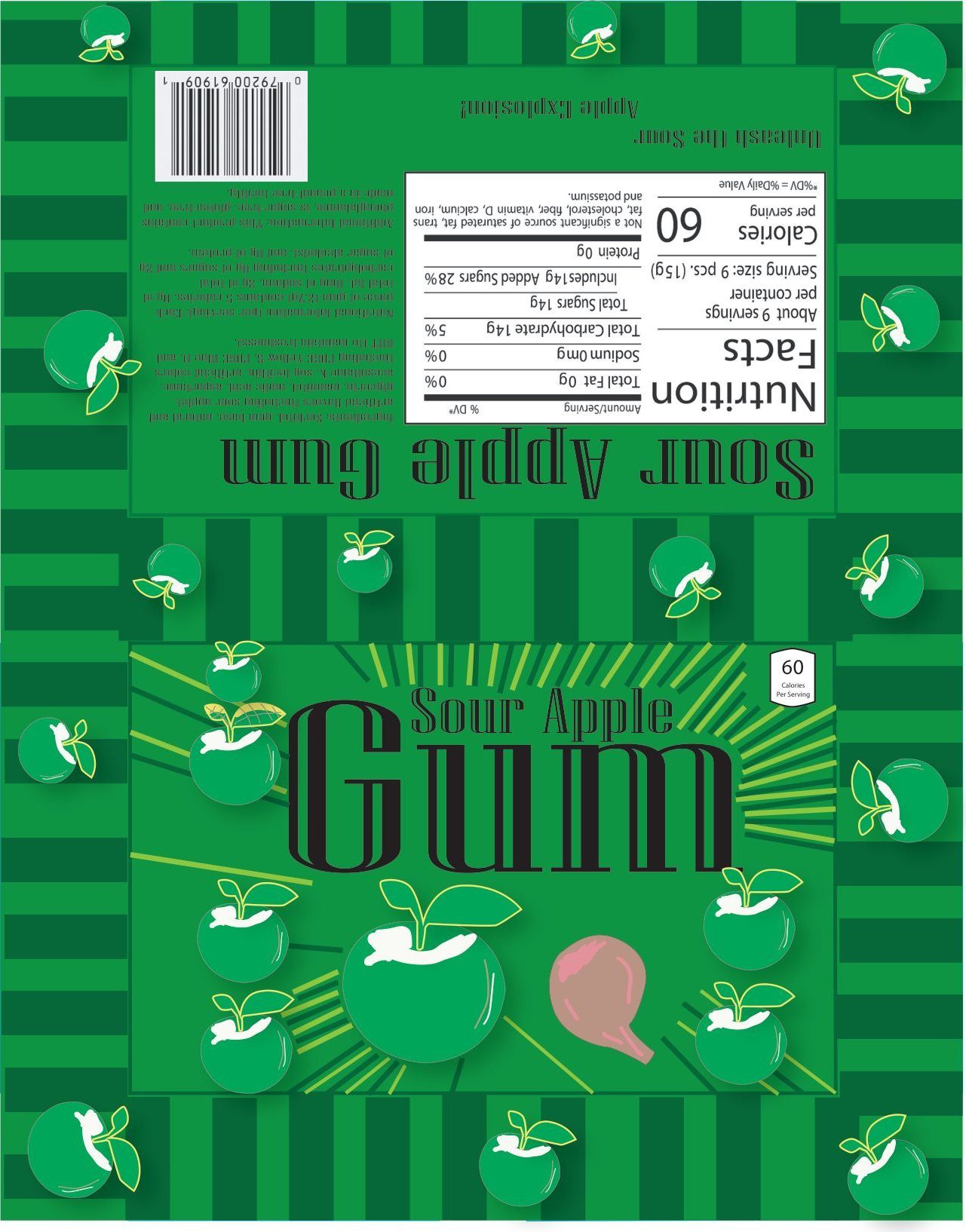
The back panel of the gum wrapper above, a packaging project from my Graphic Design Basics class at State College of Florida (SCF), holds nutrition facts, serving information and a barcode. Each one takes up real space, so packaging text should arrive before design starts.
What does a good brief look like?
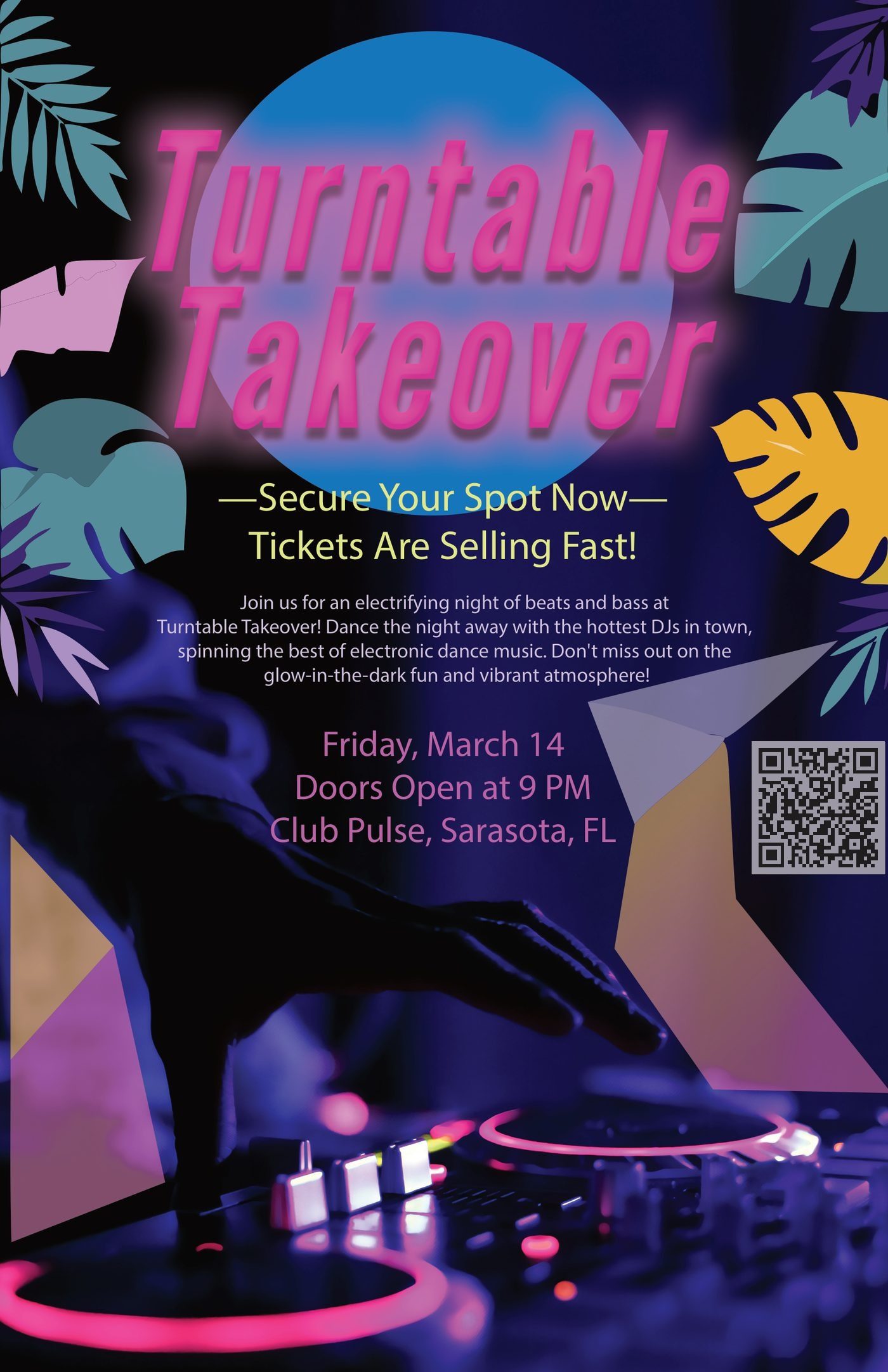
Here is a sample brief for an event poster, filled in the way a client might send it. It's based on Turntable Takeover, a poster for a fictional DJ night that I made in a Communication Design class at SCF. The deliverables and event details come from that project. The other answers are examples.
| Item | Sample answer |
|---|---|
| Goal | Sell tickets. People should scan the QR code to buy them. |
| Audience | Adults 21 and up who go out for electronic music |
| Deliverables and sizes | One 11 × 17 in print poster in CMYK, plus a 160 × 600 px animated GIF web banner built from the same artwork |
| Exact text | Turntable Takeover, Friday, March 14, doors at 9 PM, Club Pulse, Sarasota, plus the ticket link for the QR code |
| Deadline and destination | Print files to the print shop three weeks before the event; banner live the same week |
| Mood | Neon, tropical, high energy |
| Who approves | The event promoter |
Summed up in one sentence, the original class brief asked for a 4-color process event flyer laid out in Illustrator, flashy enough to pull people into the details, then a 2–4 second animated web banner built from the same artwork. That covers the goal and the deliverables. A client brief also needs the audience, the final text and the deadline. See the finished poster and banner on the poster design page.
What are the most common briefing mistakes?
- No final text. Designing around placeholder words means reworking the layout when the real copy arrives, because longer or shorter text changes everything around it. Write and approve the words first.
- No sizes. "A poster" could mean 11 × 17 in or 24 × 36 in, and a printed flyer needs a different file than a social post. Vague deliverables lead to extra rounds and surprise costs.
- Too many decision makers. When several people send notes on their own, the notes conflict and revision rounds get used up settling disagreements. Name one approver who gathers feedback and sends a single list each round.
- Adding pieces after the quote. A new size, a second version or a matching social post is new work. Put everything you might need in the first brief, even if you're not sure yet.
- Personal taste over the goal. "The owner doesn't like green" is fine to share, but also say what your customers respond to. The goal and the audience should guide the design.
- Late assets. If the logo files or photos arrive a week late, the schedule moves with them.
What happens after you send a brief?
A good designer reads the brief, asks about anything unclear, and confirms the scope, price and schedule before starting. If the scope changes later, update the brief in writing so everyone works from the same version.
Here's how it works when you send a brief to me:
- I reply with any questions and a fixed quote, so you know the price before any work starts.
- The first draft arrives 2–4 business days after I have your details. Rush jobs are possible, so tell me your deadline up front.
- Three rounds of revisions are included. Extra rounds are billed hourly, and I'll tell you before any extra charge.
Starting prices and the files you get are listed in the FAQ. More free guides, including logo file types and print sizes, are on the guides page.
Need a hand?
If you'd like help turning your notes into a brief, send what you have and I'll ask about the rest. I'm a graphic designer in Palmetto, FL, and I work with local and remote clients. Vehicle wraps are design only: I work to your installer's template and specs, and the wrap shop prints and installs.
The Start-a-project form asks what you need, when you need it and about the project, so paste your checklist answers into the project box. Email your logo files, photos and examples to warrellbrandon1@gmail.com, or share a Google Drive or Dropbox link if they're large. Prefer to talk it through? Book a 15-minute call, Monday to Friday, 9am–6pm ET.