
Article · Brandon Warrell
How to make a neon text effect in Photoshop
To make neon text in Photoshop, set an even-weight script on a dark, textured background. Then build the tube with layer styles: a pale core, an Inner Glow and a Stroke in the tube color, and an Outer Glow around it. Add a blurred copy behind the type so the light spills onto the wall, add a shadow, and leave one element unlit so the lit part has something to compare against. If the piece is going to print, check the glow color in a CMYK preview before you send it.
My class piece below shows which choices make the effect read as real. The steps are a general method, not the exact settings I used.
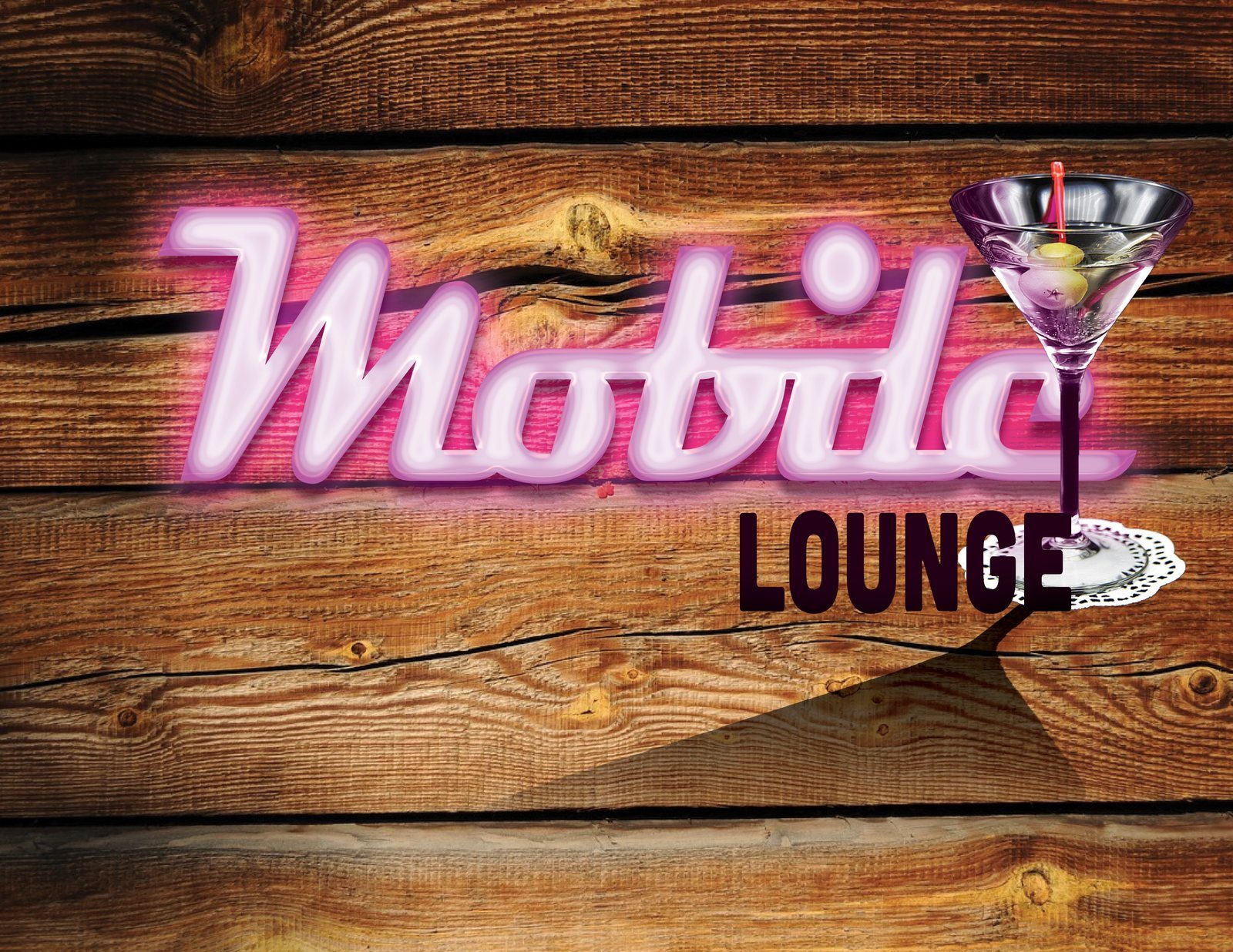
Mobile Lounge Neon was a layer-effects lesson in my SCF Photoshop course, Spring 2025. The course supplied the source photo; I didn't shoot it.
Which fonts look like real neon tubes?
Real neon is glass tubing bent into letters, so the line keeps an even thickness and the ends look rounded. Look for type that behaves the same way:
- Even stroke weight. A monoline or near-monoline script reads as tubing. Fonts with thick and thin strokes look printed, not bent.
- Rounded ends. Sharp serifs and flat cuts break the illusion.
- Connected or simple letters. A connected script looks like one long tube. Simple sans-serif capitals also work.
In Mobile Lounge Neon, "Mobile" is a bold connected script with rounded ends; the pale core and the outline make it read as one bent tube even where the weight varies.
What background makes the glow read?
A glow needs contrast and something to land on. Use a dark-to-mid, textured surface: brick, wood, concrete or a painted wall. Pure black works but looks like a void. Texture shows the light falling across it.
The wood in my piece is warm brown, mid-to-dark rather than black, with knots and cracks for the pink light to tint.
Which layer styles build the tube and the glow?
Open the Layer Style dialog by double-clicking the type layer (outside the layer name or thumbnail), clicking the layer style icon at the bottom of the Layers panel, or choosing Layer > Layer Style. Check the box next to each effect to turn it on. Adobe's overview of layer effects and options explains every setting.
A practical way to build the sign itself is on two layers; the wall light in the next section adds a third.
Layer 1: the tube
- Set the type in a pale color, near white or a very light tint of your tube color. You can also use Color Overlay to fill it. This is the hot core of the tube.
- Add Inner Glow in the tube color. It adds a glow along the inside edges of the letters. Set Technique to Softer, and use Choke and Size to control how far the color creeps in toward the pale center.
- Add Stroke in the tube color, with Position set to Outside or Center. This gives the tube a defined edge.
Layer 2: the glow
- Duplicate the type layer and move the copy below the original.
- On the copy, add Outer Glow in the tube color. Use Spread and Size to set how far the light reaches.
Why two layers? Some effects, such as Stroke and Drop Shadow, have a + icon for adding a second copy. The glows don't, so a duplicate layer is the simple way to get a wider glow.
How do you light up the wall behind the sign?
Real neon tints whatever is behind it. To fake that, add a soft blurred copy of the letters under everything else:
- Duplicate the type layer again.
- Photoshop can't blur a live type layer. Either choose Layer > Rasterize > Type, which makes the text uneditable, or choose Layer > Smart Objects > Convert to Smart Object, which keeps it editable. Adobe's page on rasterizing type layers covers both routes and suggests the Smart Object one when you want to keep the text editable. If you rasterize, keep an editable copy.
- Apply Filter > Blur > Gaussian Blur with a large Radius. On a Smart Object it becomes a Smart Filter, so you can change the radius later.
- Set the layer's blend mode to Screen or Color Dodge and lower the opacity until the wall looks lit, not painted.
In my piece, the wood around "Mobile" picks up a pink tint. That spill does more for realism than any single layer style.
What makes a neon sign look real instead of flat?
Look at the realism choices in Mobile Lounge Neon:
- A pale core. The centers of the letters are near-white to lavender, with pink at the edges. A glow that's one color all the way through looks like a sticker.
- One hue family. The pink, the purple edge and the near-black plum "LOUNGE" all sit in the same pink-to-purple range. The olives and the red pick are the only small exceptions.
- Shadows. The martini glass and its doily cast a long, hard-edged shadow across the wood, and the tube letters have a slight offset shadow under their strokes. A small Drop Shadow adds depth.
- Something unlit. "LOUNGE" is a solid, near-black plum, condensed bold sans serif with no glow at all. Next to it, the glowing "Mobile" looks switched on. If everything glows, nothing does.
For more on when a job belongs in Photoshop and when it belongs in a layout or vector app, see Illustrator vs Photoshop vs InDesign.
Will neon colors look the same in print?
Not always. Adobe's help explains that some colors you can display in RGB fall outside the CMYK range a press can print, and that highly saturated colors are the ones most likely to shift. A bright neon pink is worth checking.
- In the View menu, set the on-screen color preview to Working CMYK, or to the profile your printer gives you, and turn the preview on.
- Choose View > Gamut Warning. Pixels outside the gamut of the profile you picked in step 1 are highlighted, in gray by default.
- Bring the highlighted areas back in by reducing saturation, adjusting those colors, or picking a CMYK-safe color with the alert triangle in the Color Picker.
Adobe's page on out-of-gamut colors covers each option. The on-screen preview is only as good as your monitor and its profile, so ask your printer for their requirements first, as Adobe's guide to commercial printing also advises.
Glowing type shows up in print work too. My Turntable Takeover poster, an 11 × 17 in poster for a fictional DJ night (SCF coursework, Communication Design, Spring 2025; DJ photo: stock image), pairs glowing pink display type with tropical leaf shapes and was set up in CMYK (U.S. Web Coated SWOP v2). You can see it with my other projects on the work page.
If you need an event poster or flyer with this kind of look, prepared as a print-ready file, see poster design. Pricing and file details are in the FAQ.