
Article · Brandon Warrell
How to turn a poster into an animated GIF banner in After Effects
To turn a poster into an animated GIF banner, restack the artwork for the banner's shape, bring it into After Effects, animate a small part of it, and export through Media Encoder or Photoshop, since After Effects can't write a GIF by itself. Scaled to 160 px wide, an 11 × 17 poster is only about 247 px tall, leaving 353 px of a 160 × 600 banner empty and the type too small to read.
How do you turn a poster into an animated GIF banner?
Work in that order: layout first, motion second, file size last. My example is Turntable Takeover, a campaign for a fictional DJ night that I made as sole designer for an SCF (State College of Florida) Communication Design class in Spring 2025. The brief asked for "a 4-color process event flyer laid out in Illustrator, flashy enough to pull people into the details, then a 2–4 second animated web banner built in After Effects from the same artwork." The banner reuses the poster artwork so both pieces read as one campaign.
The tool steps below are the methods Adobe documents, not a record of my class file.
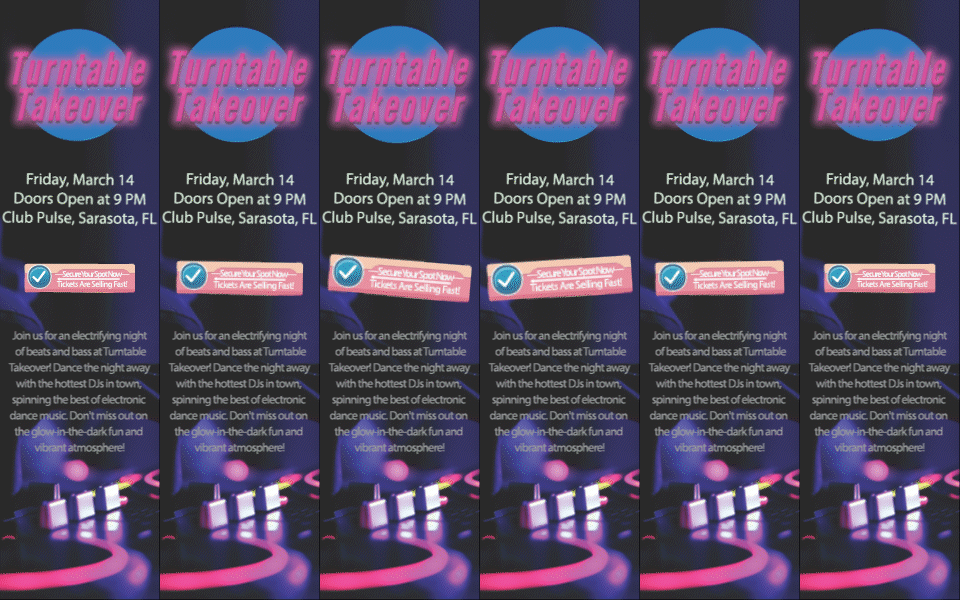
What has to change when a poster becomes a skyscraper banner?
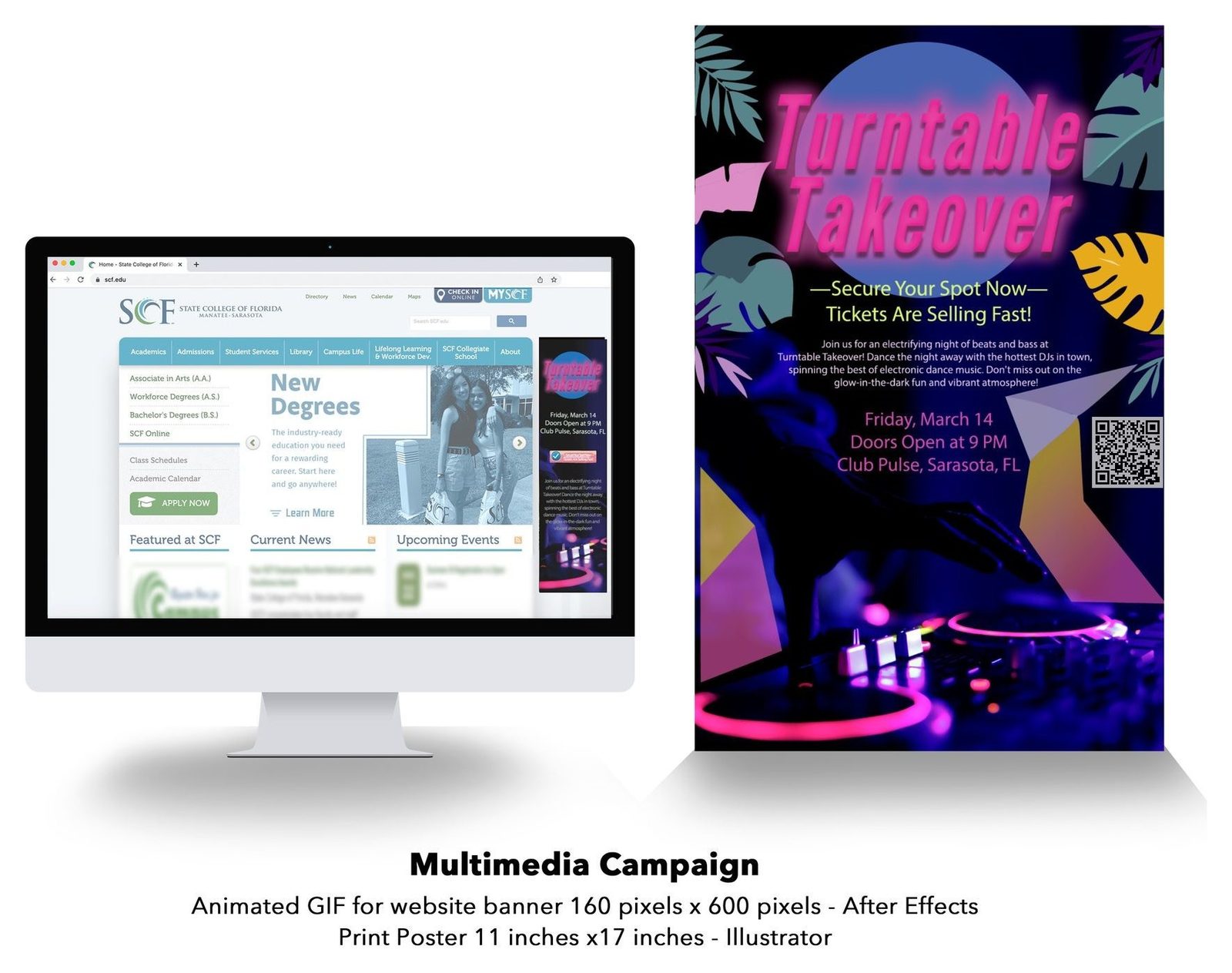
An 11 × 17 poster is about 1:1.55. A 160 × 600 skyscraper is 1:3.75, more than twice as tall for its width. So you restack the pieces instead of shrinking the whole page, and the order can change too. Here's how the two pieces compare, top to bottom:
| Position | Poster (11 × 17 in) | Banner (160 × 600 px) |
|---|---|---|
| 1 | Title | Title |
| 2 | "Secure Your Spot Now" line | Date, doors and venue |
| 3 | Description | "Secure Your Spot Now" button |
| 4 | Date, doors and venue, beside a QR code | Description |
| 5 | DJ decks photo | DJ decks photo |
The plain "Secure Your Spot Now" line becomes a button with a checkmark, and the QR code and the decorative leaf and angular shapes are gone.
A click can do a QR code's job, and decoration is the first thing to give up in a 160 px column.
How do you bring Illustrator artwork into After Effects?
Prepare the file in Illustrator. Here's how Illustrator, Photoshop and InDesign differ if you're unsure which app does what.
- Make an RGB copy. My poster was CMYK (U.S. Web Coated SWOP v2), which suits print. After Effects can import a CMYK .ai file and convert the values, but Adobe recommends converting to RGB first, because it can't assign an input profile to CMYK files. In Illustrator, use File > Document Color Mode > RGB Color.
- Separate what will move. Anything you plan to animate needs its own top-level layer. In Illustrator's Layers panel menu, Release to Layers (Sequence) puts each object on a new layer nested under the original, so drag them out to the top level. Select Create PDF Compatible File when you save.
- Import it. Choose File > Import > File, then "Composition - Retain Layer Sizes" from Import As. Each layer keeps its own dimensions, so its anchor point sits at the center of its own artwork.
- Convert to shapes if you need to. Layer > Create > Create Shapes from Vector Layer makes an editable shape layer, though imported layers can be animated as they are. The wording can vary by version.
What should move, and what should hold still?
Move as little as you can. A date nobody can read because it's sliding around is wasted.
In my file, the motion stays in the top part. The title glow brightens and fades, and the button grows, rocks side to side and shrinks back. The date, doors and venue hold still, and the description and photo are pixel-identical in all 50 frames. Nothing enters or leaves, so every frame carries the full message. The button is back close to its starting size and angle by the last frame, so the change at the loop point is no bigger than any other step in the motion.
If your animation builds in or stops, plan the last frame first. It should show the message and the button.
Decide how it loops. Mine loops forever. WCAG 2.2, the web accessibility standard, says moving content that starts on its own, lasts more than 5 seconds and runs alongside other content needs a way to pause, stop or hide it. A GIF that stops within 5 seconds stays out of that rule.
How do you export an animated GIF from After Effects?
Adobe's supported formats page lists GIF and animated GIF as import only, though third-party plug-ins can add formats. That leaves three routes:
- Media Encoder. Choose Composition > Add to Adobe Media Encoder Queue, then pick Animated GIF as the format. Adobe's pages for it don't list color or loop controls, so for those, finish in Photoshop.
- QuickTime, then Photoshop. Adobe's After Effects rendering page gives this route. Render a QuickTime movie, then in Photoshop choose File > Import > Video Frames to Layers. Set looping in the Timeline panel, which offers Once, 3 Times, Forever or Other, and export with File > Export > Save for Web (Legacy).
- Still sequence, then Photoshop. Render a PNG sequence from After Effects. In Photoshop, choose File > Open, select one image, tick the Image Sequence checkbox, open it and enter your frame rate. Then use the same Save for Web dialog.
Save for Web is labeled legacy, so menu names can differ in your version.
How do you get the file size down?
My file is a fair starting point: 50 frames at 40 ms each, which is 2.0 seconds at 25 fps, 256 colors and 1,114,258 bytes, about 1.1 MB. It's class work, and I'm not claiming it meets any ad network's limits. The controls to reach for:
- A shorter animation. Cut the duration, since every frame you drop is one less to store.
- A lower frame rate. Halving mine would keep the 2.0 seconds at 25 frames × 80 ms, or 12.5 fps. Set it in Composition > Composition Settings > Frame Rate.
- Fewer colors. GIF tops out at 256 colors. Lower the Colors menu in Save for Web a step at a time.
- Less dither. Dithering fakes missing colors by blending pixels, and Adobe notes it can increase file size. Reduce or turn off dithering.
- Less area that changes. Everything below my button is already static. If yours isn't, ask whether it has to move.
The savings depend on your art, so export after each change and read the file size. Changing the loop count won't help, since the frames stay the same.
How do you check the banner before it goes live?
- View it at actual size. Preview in Save for Web opens the GIF in a browser. Every line should read at 100%.
- Look at the glows and gradients. Fewer colors and less dither can show up there as banding.
- Watch the loop point. Look for a jump, and make sure it stops or repeats the way you set it.
- Check the limits. If it's running through an ad network, compare the file against that network's rules, which banner ad sizes covers.
- See it in place. I presented mine on a board, on an SCF website screenshot beside the poster.
Need an animated banner made from your artwork?
I design animated web banners, and the Turntable banner shows how one can grow out of a poster or flyer so both read as one campaign. The FAQ answers common questions about how projects work.