
Article · Brandon Warrell
How to make a shape out of words: a typographic poster walkthrough
To make a shape out of words, start with a short list of words that belong to the subject. Then pick a silhouette people can name in a second, and fill it with those words: a few big anchor words for mass, and many small ones to trace the edge. Keep the shape clearly separate from the background, check it from across the room, and close any gaps before you add the logo and send a print-ready PDF.
Two posters I made for a Typography course at SCF (State College of Florida) show the idea: one for the International Rhino Foundation and one for Habitat for Humanity. Both were class projects, not commissioned by either organization, and the logos belong to them. The Illustrator steps below are general methods, not a record of exactly how I built mine.
What did the brief ask for?
The brief was to promote a real nonprofit with a typography poster: at least 12 different words forming a meaningful shape, strong figure-ground, and the organization's logo and website.
Figure-ground is how we split what we see into a figure, the object we focus on, and the ground, which is the background. On a word poster, the shape has to win that split. If the words spread evenly across the page, the eye reads texture instead of a picture. If you are writing a brief like this for your own project, my guide to writing a design brief covers what to include.
Should you use a word-cloud generator or build it by hand?
Word-cloud generators are fast. You paste in a list, pick a mask shape, and the tool fills it in seconds, which is handy for testing a silhouette.
The trade-off is control. A generator sizes words by how often they appear or by its own settings, then places them wherever they fit, so you don't choose which word sits on the horn or the roofline. You also have less say over how crisp the edges come out. Export also varies: some tools give you a vector file and some give you an image. If you plan to print, check what your tool exports first.
Building it by hand takes longer but lets you decide every word's size and position.
Which words should fill the shape?
Take the words from the cause's own vocabulary. The words are the message, so a reader who leans in should learn something.
For the rhino poster I used twelve conservation terms: Poaching, Ranger, Translocate, Genome, Snare, Calf, Drone, Collar, Sumatra, Keratin, Extinction and Fragmentation. They repeat at many sizes to build a black rhino's head and shoulders. For Habitat for Humanity, words such as Build, Hope, Shelter, Dignity and Community fill the shapes, along with Home, Volunteer, Together and others.
A few tips for your list:
- Mix long and short words. Long words fill broad areas, and short words fit into corners.
- Keep the list tight. The brief asked for at least 12 different words, and a short list repeated at different sizes is enough.
- Read the list out loud. It should sound like the organization talking.
How do you pick a shape that reads at a glance?
Choose a silhouette with one or two features nobody can mistake. A rhino's horn and the line of its head do that work. A house roof does it for shelter.
If the organization already has a mark, echo it. Habitat for Humanity's logo uses a roof and a family, so that poster fills a roof and a three-figure family with words. The poster and the logo then say the same thing in two ways.
Test the shape before you place any words. Fill it solid, shrink it to thumbnail size, and ask someone what it is. If they hesitate, simplify it.

On the Habitat poster, the shapes are white with black words on a cyan field. Several words, such as Hope, Home and Together, curve to follow the shapes they sit in.
How can you build the shape in Illustrator?
There are three common ways to do this in Adobe Illustrator.
Area Type
Draw your silhouette as a path, choose the Area Type tool, and click on the path. Text you type or paste then flows inside the shape. Double-click the Area Type tool to open Area Type Options and set offset, columns and alignment.
Area Type flows words as running text, line after line, so you still have to select words and resize them by hand to get big anchors and small edge words.
Envelope Distort
Set a word or block of words, put your shape on top of it, select both, and choose Object > Envelope Distort > Make with Top Object. The text warps to fit the shape. It is quick for one word bent into an arch, but a full silhouette can stretch letters until they are hard to read.
Manual build
Place your silhouette on its own layer. In the Layers panel, double-click the layer and turn on Template. Illustrator locks and dims a template layer, so it stays put as a guide. Then place each word as its own text object, scale it and rotate it until it fits the outline.
This is the slowest method and the one that gives you the most control. If you want a clean edge at the end, a clipping mask can trim anything that pokes past the outline. Hidden parts are kept, not deleted, so you can still adjust them later.
If you are choosing a program for this, my comparison of Illustrator vs Photoshop vs InDesign explains where each one fits.
How do big and small words work together?
Big words give the shape mass. Put them where the form is widest, like the cheek and shoulder of an animal or the middle of a roof, so the silhouette reads from a distance.
Small words do the detail work. They trace the edge, fill the gaps and carry fine features like an ear or a horn tip.
Contrast helps too. On the rhino, the words are white, blue-gray and dark slate on black, and a cluster of white words near the center stands out against the gray ones, which gives the eye a focal point inside the shape.
What did critique change on the rhino poster?
Here is the rhino poster as I first submitted it, before it was revised after critique in 2026.
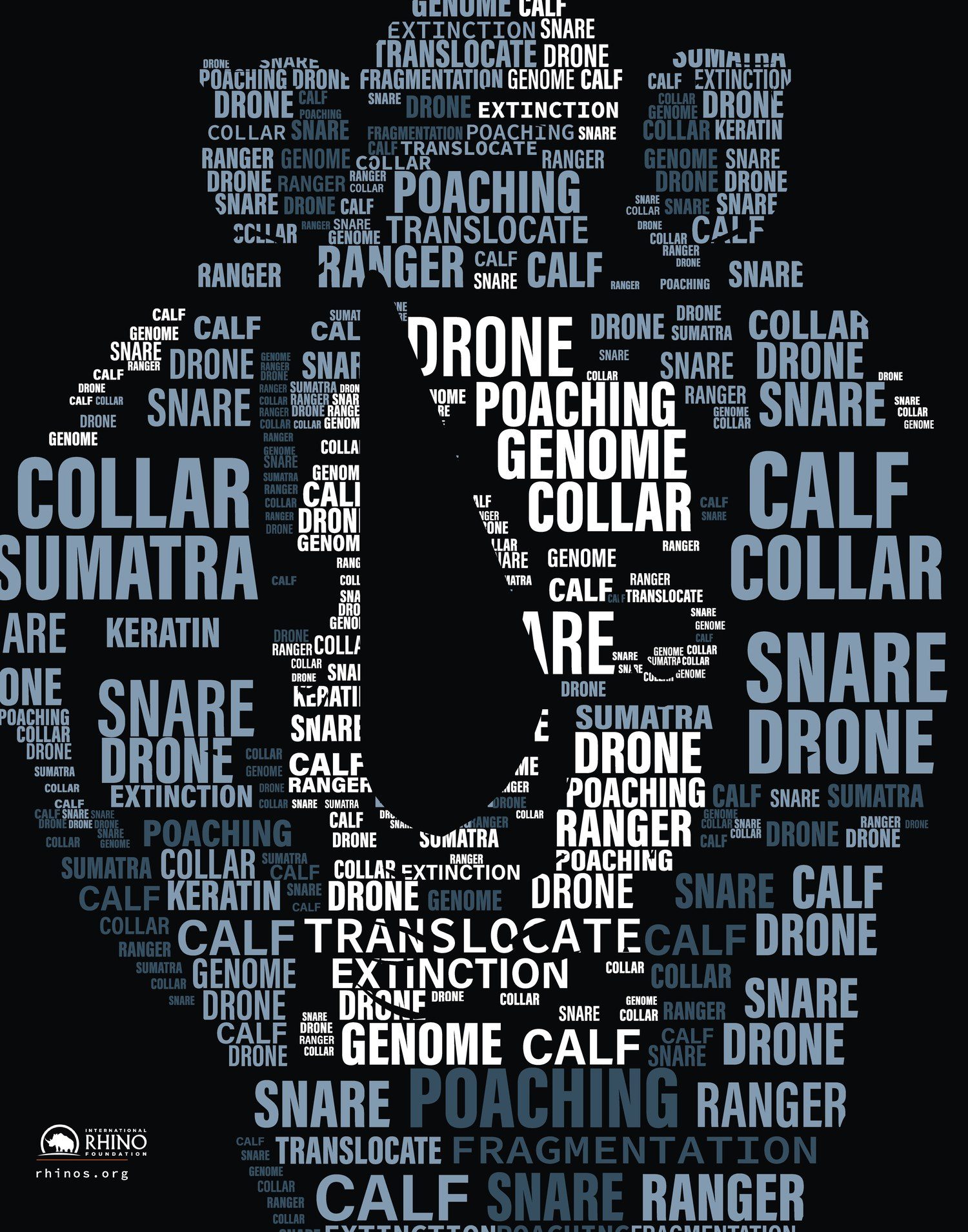
In this version, the silhouette runs off the left edge, the top and the bottom, and cropped words sit at the edges of the page.
After critique, I scaled the rhino to 90% so the silhouette has room to breathe, and added about 400 more small words from the same list to close the gaps and sharpen the outline.
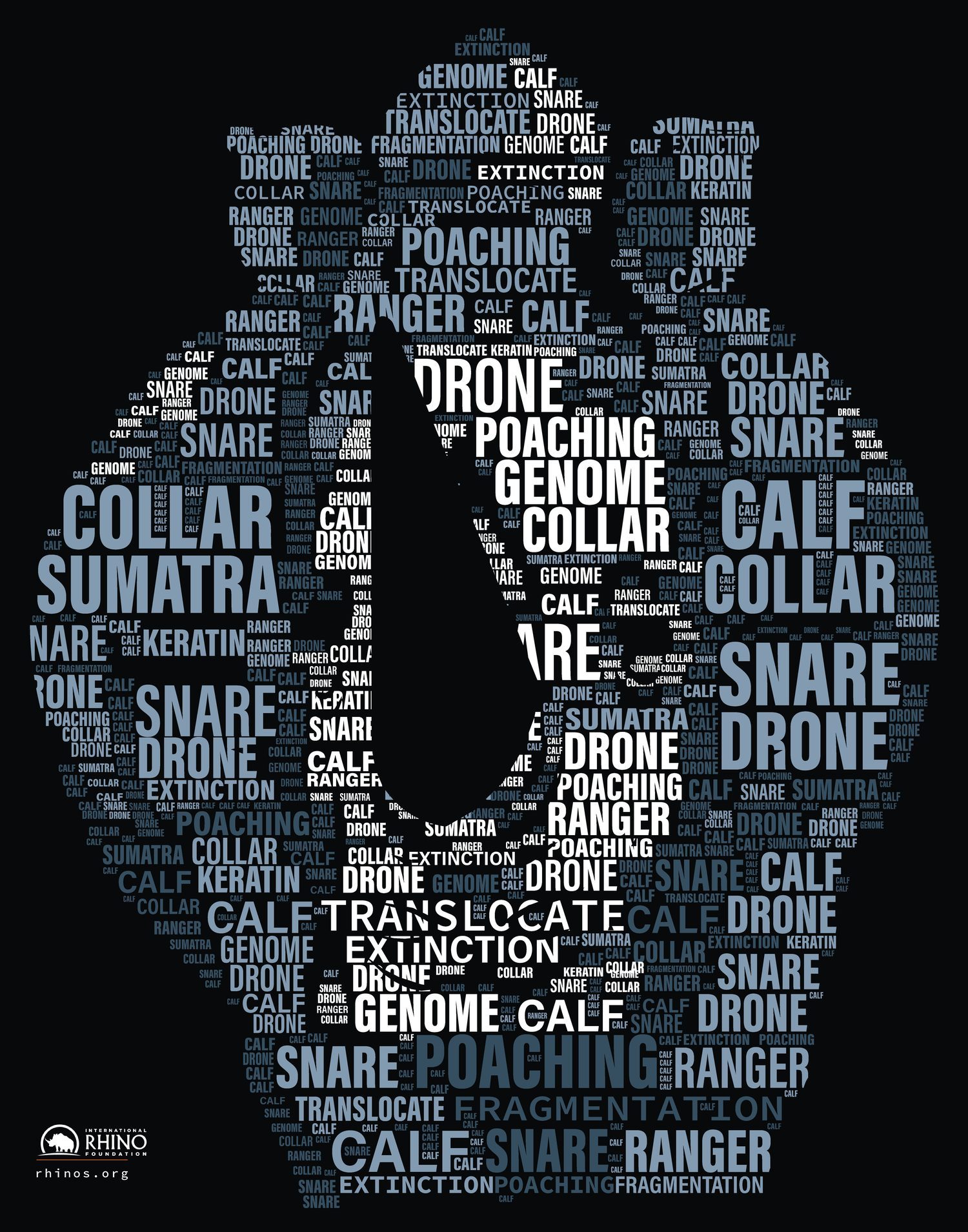
In the revision, the whole head sits inside the black field instead of running off the edges, and many tiny words fill the spaces between the big ones.
How do you add the logo and website and get it ready for print?
The logo and web address shouldn't compete with the shape. On the rhino poster, the IRF logo and rhinos.org sit small in the lower left. On the Habitat poster, the logo is larger in the lower left and the web address sits at the lower right.
Then set up the file for print. The rhino poster is 11 × 14 in and the Habitat poster is 11 × 17 in. Both went out as print PDFs with 0.125 in bleed. In Illustrator's Save Adobe PDF dialog, the Marks and Bleeds section is where you set bleed, or you can turn on Use Document Bleed Settings if you set bleed when you made the document. Some printers ask for a different bleed amount, so check with yours. My poster sizes guide lists common sizes with bleed and pixel dimensions.
Before you print the full size, make a small test print. Small words that look fine on screen can fill in or disappear on paper.
If you need a poster designed, see my poster design page, and the FAQ covers starting prices and what files you get.